OldRoll App Review: Features, Pricing, and Is It Worth It?
The oldroll app has become one of the most talked-about vintage camera apps for a reason: it recreates specific film cameras in detail rather than applying a single generic filter. This review breaks down what OldRoll actually offers, how its pricing works, and whether it is worth installing over other retro camera apps.
What Is OldRoll?
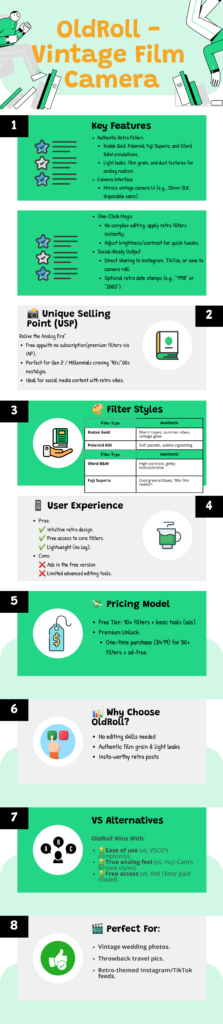
OldRoll is a mobile app that simulates classic film and disposable cameras. Instead of a single filter, it offers a collection of distinct camera modes, each modeled after a real device, from instant cameras to fisheye lenses and Super 8mm-style video. Every mode reproduces its own color grading, grain, and light leak behavior.
Standout Features
OldRoll’s biggest strength is its attention to physical detail. Shots include realistic shutter delays, film winding animations, and unpredictable light leaks that feel like part of the shooting process rather than a filter applied afterward. The app also includes a double exposure mode, watermark and date stamp options, and support for importing existing photos to apply the same effects. Together, these details give finished photos a texture that is difficult to replicate with a single static filter overlay.
How OldRoll’s Pricing Works
The app is free to download and includes a handful of cameras at no cost. Unlocking the full camera library requires either a one-time payment or individual purchases for specific cameras. Consequently, casual users can get a genuine feel for the app before deciding whether the premium unlock is worth the cost for their workflow. Watching for seasonal discounts on the full unlock can also reduce the overall cost significantly.
What Users Like
Reviewers consistently praise the authenticity of OldRoll’s film simulation, particularly the variety of camera styles compared to single-effect competitors. The skeuomorphic design, where each camera feels like its own piece of hardware, also stands out as a favorite detail among frequent users. Many reviewers also mention that results look convincing enough to share without additional editing in a separate app.
Common Complaints
The most frequent criticism involves the paywall blocking most cameras behind a purchase. Additionally, some users report occasional crashes and trouble importing or exporting photos after app updates. Our guide on fixing OldRoll when it crashes covers targeted solutions for these issues. Keeping the app updated to the latest version resolves many of these reported bugs over time.
Is OldRoll Worth Downloading?
For users who want authentic film camera simulation with real behavioral detail, OldRoll delivers more depth than most single-filter competitors. However, if you only want a quick disposable camera look without paying for extra cameras, a simpler free app might suit you better. Our roundup of OldRoll alternatives compares several other options. Ultimately, the right choice depends on whether you value depth and variety over simplicity and cost.
Getting Started with OldRoll
If you decide to try OldRoll, our download guide walks through installation on Android and iOS. Once installed, spend time experimenting with the free cameras before committing to any paid unlock, since different camera styles suit different subjects and lighting conditions. Taking test shots in varied lighting, from indoors to bright daylight, gives you a clearer sense of which camera mode fits your usual style.
Camera Variety Compared to Competitors
Most single-purpose retro camera apps offer one look with minor variations. OldRoll instead provides a growing library of distinct camera modes, including instant-style formats and toy cameras, each with its own film stock behavior. This breadth is a major reason frequent users stick with the app rather than switching between several single-effect tools.
Performance and Device Requirements
OldRoll runs on most modern Android and iOS devices without heavy hardware demands, though older phones may experience slower processing when applying detailed film effects. Keeping the app updated generally improves performance, since developers regularly patch bugs reported in earlier versions.
Is OldRoll Worth Downloading Today?
Weighing the free tier against the premium unlock ultimately comes down to how often you plan to shoot. Casual users typically find the default camera library sufficient for occasional posts, while frequent photographers often justify the one-time premium cost through daily use. Consequently, testing the free version thoroughly before upgrading remains the safest way to judge whether OldRoll fits your workflow long term.
Frequently Asked Questions
Is the OldRoll app free to use?
Yes, OldRoll is free to download and includes several cameras at no cost, though the full library requires a paid unlock.
What makes OldRoll different from other filter apps?
OldRoll recreates specific cameras with realistic behavior, such as shutter delays and film winding, rather than applying a single static filter.
Does OldRoll work on both Android and iOS?
Yes, OldRoll is available for both Android and iOS devices through their respective official app stores.
Can I edit photos I already have with OldRoll?
Yes, OldRoll supports importing existing photos and videos to apply its vintage camera effects.
Is OldRoll better than Huji Cam?
It depends on your needs. OldRoll offers more camera variety and detail, while Huji Cam focuses on a simpler, single disposable camera experience.

